
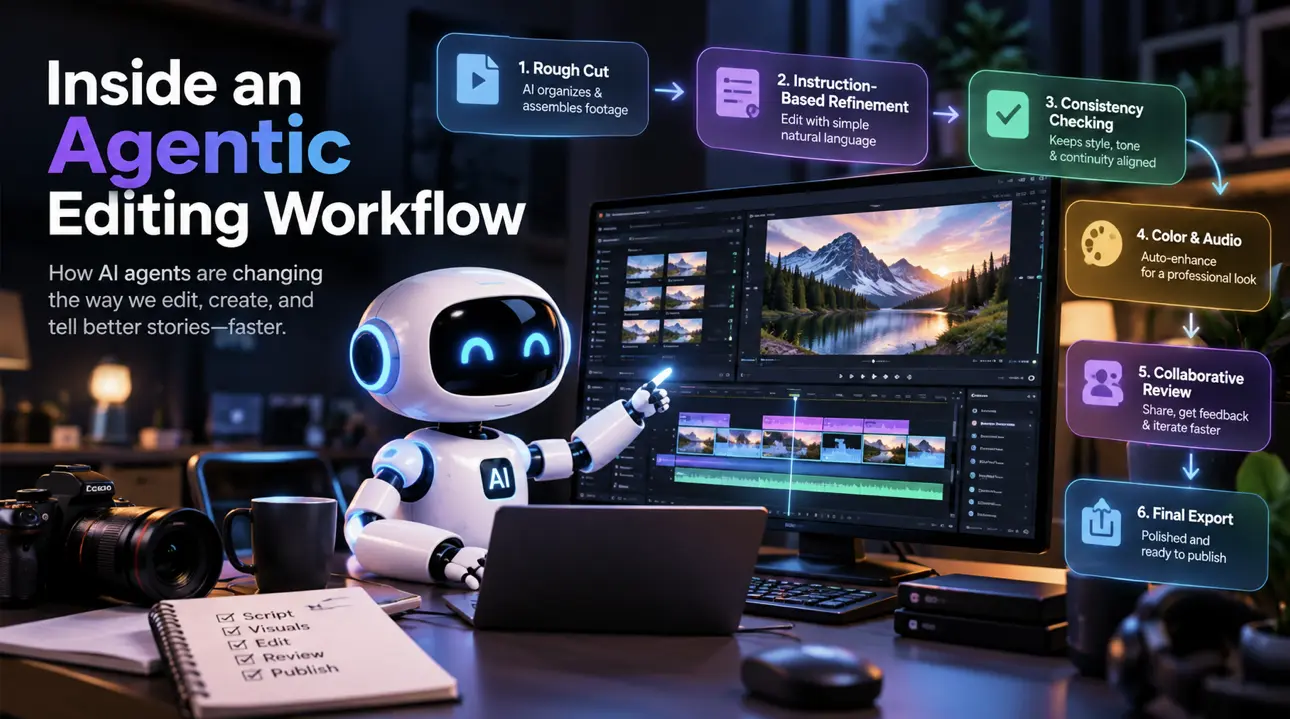
Following one project through a full agentic editing workflow, start to finish, shows how the individual pieces, automatic assembly, plain-language instructions, consistency checking, collaborative review, actually connect into one continuous process rather than being separate, disconnected features. Most explanations of agentic editing describe one capability at a time, an assembly feature here, a consistency check there, without showing how a real project actually moves through all of them in sequence. Walking through the whole arc, from raw material to a finished, exported file, makes clear why this is a genuine workflow and not just a bundle of individually impressive tricks.
Stage one: the rough cut, assembled automatically
The workflow starts with raw material, whether that’s generated footage, filmed footage, or a mix of both, and a plain-language description of the project’s intended shape: what it opens with, what the middle needs to cover, how it should end. An agentic system reviews that material and builds an initial structural assembly around the described intent, identifying natural cut points, estimating reasonable pacing for each moment, and choosing transitions suited to what each specific cut is actually doing. This first pass isn’t the finished video, but it turns raw, unorganized material into something with an actual shape a person can react to.
What actually happens during this stage matters more than it might seem to at first glance. Reviewing raw footage to find usable takes, identifying where a sentence or an action naturally completes, and deciding roughly how long a given moment deserves to hold are each individually small judgments, but there can be dozens or hundreds of them in even a modest project. Doing all of this manually is exactly the kind of repetitive, time-consuming work that historically ate the first hours of any editing project without producing anything genuinely creative yet. Compressing it into one automatic pass doesn’t eliminate the judgment involved, a system still has to make real decisions about where a cut belongs and how a moment should be paced, but it means a director’s first real look at the project is a structured sequence rather than a folder of disconnected clips.
It’s worth being specific about what this stage does and doesn’t accomplish. It produces structure: an order, a set of cut points, rough pacing. It does not yet produce a finished feel, since feel can only really be evaluated once there’s something to actually watch play out. This is a genuinely different kind of output than a manual editor’s first rough stringout would be, not because the underlying goal is different, but because it’s reachable in minutes rather than hours, which changes how quickly a project can move into the stages that follow.
Stage two: refinement through instructions, including combined ones
With a rough cut in place, refinement happens through plain-language instructions rather than manual timeline scrubbing. A single instruction might bundle several related changes at once, “tighten the middle section, swap the music, and add a fade at the end,” which the system resolves into its separate sub-changes, executing any that depend on each other in the right order while applying independent ones without interference. A follow-up correction, “a bit more than that,” builds directly on the previous instruction’s target rather than requiring the whole request restated from scratch.
This stage is where most of a director’s actual creative attention gets spent, and for good reason. Watching the automatically assembled sequence surfaces things a description alone never could, a transition that reads as jarring once actually seen, a moment that needed more room to land, a section that drags in a way nobody could have predicted before watching it play. Each of these becomes a targeted instruction rather than a full manual rebuild, which is the specific advantage this stage offers over traditional refinement: a director describes what’s wrong, “this section feels rushed,” rather than needing to know the exact technical operation, adjusting a specific duration value, that would fix it.
The multi-step case deserves particular attention here, since real refinement instructions are rarely single, isolated requests. A director reviewing a scene often identifies several things that need to change at once, and being able to describe all of them in one pass, trusting the system to work out which changes depend on each other and which are independent, is a meaningfully faster loop than addressing one issue, waiting to see the result, and then addressing the next. It’s also worth noting that not every instruction lands correctly on the first attempt, particularly the more subjective ones. “Make this feel more emotional” has several plausible interpretations, and a reasonable system treats a vague instruction like this as an opening move in a conversation rather than pretending to resolve it with false confidence. The iterative back-and-forth this sometimes requires is a normal, expected part of the process, not a sign the tool failed.
Stage three: checking consistency, if the project involves generated content
For a project including AI-generated shots, this is where a persistent context check runs, verifying that a character, environment, or established visual rule holds consistently across every shot rather than drifting from one generation to the next. This isn’t a discrete stage a person triggers manually, it’s a continuous check that runs as new material enters the project, flagging or correcting a mismatch before it becomes visible in the finished cut.
The reason this stage exists at all, and has no real traditional-editing equivalent, comes down to a basic difference between filmed and generated material. A real actor filmed across multiple takes in the same room naturally looks like the same person in the same space, since physical continuity handles that by default, and it only breaks when something actually changes on set. Generated content has no such default. Each generation is technically an independent event with no built-in memory of what came before it, which means a character can look subtly different from shot to shot not because anything changed, but because nothing was holding it the same in the first place. A persistent context engine solves this by attaching a locked reference, and the project’s established rules, to the project itself rather than to any individual generation, so a reference made on shot three hundred resolves the same way it did on shot three.
For a project mixing generated and filmed material, this stage does double duty, checking generated shots against the established reference and also flagging where a generated shot’s visual language, its lighting, its camera grammar, might clash against the filmed footage it sits next to. Catching this here, continuously, rather than discovering it only once the whole sequence is assembled and reviewed, is what keeps a mixed-source project from requiring a separate, dedicated pass just to reconcile the two kinds of material after the fact.
Stage four: color and audio, matched deliberately
Once the structure is settled, color and audio get their own pass, matching footage from different sources to a consistent baseline before any creative styling gets applied on top, and leveling or adjusting audio so the project sounds consistent throughout. This stage benefits from happening after structure is locked, since polishing material that ends up cut from the final edit wastes that effort.
Color work at this stage happens in two related but distinct steps, worth separating clearly. Correction comes first: fixing exposure and white balance issues and matching footage from different sources or cameras to a neutral, consistent baseline. Only once that baseline is established does grading happen, the actual creative decision about warmth, contrast, and mood. Doing these out of order, styling before the underlying footage is corrected, means the creative work often needs redoing once the correction catches up, since a color treatment reacts differently to footage that’s properly balanced than to footage that isn’t. This two-step sequence matters specifically for projects combining footage from more than one source, since that’s exactly where inconsistency is most likely to show up and least likely to be caught by eye alone.
Audio at this stage isn’t just about levels. Matching room tone and general acoustic character across cuts that are meant to feel continuous, and making sure a music choice’s energy actually fits the pacing the earlier refinement stage settled on, are both part of getting this stage right. A mismatch here, mismatched ambient sound across a cut, music that doesn’t suit the tightened pacing next to it, tends to be more noticeable to a viewer than a director expects, since audio carries information about continuity and mood that a viewer registers even without consciously analyzing it.
Stage five: collaborative review on the live project
Rather than exporting a cut and collecting feedback separately, review happens directly on the shared project, with editors, collaborators, and anyone else reviewing the work all seeing the same live timeline. A note lands precisely on the specific shot or moment it concerns, and can be addressed immediately rather than triggering a full export-review-reimport cycle. You can edit video with AI at exactly this stage the same way you did earlier in the process, describing a change directly rather than manually locating and adjusting it.
This stage matters more than a simple “and then people give feedback” description suggests, because the traditional alternative carries real, often underestimated costs. A revision cycle built around exported files and separate feedback threads has to pay a context-reload tax every time someone returns to the project, re-establishing an understanding that faded since the last session, and a small requested change can ripple into effects nobody accounted for, a pacing shift throwing off a transition that was timed against the old version. Reviewing directly on a live, shared project removes at least the reload portion of that cost, since the project’s structure and established decisions remain visible and intact between sessions rather than needing to be mentally reconstructed each time a collaborator picks it back up.
It’s also worth being honest that this stage doesn’t happen just once in most real projects. A director might review a scene’s pacing, hand it to a colorist-focused pass, then bring in a sound-focused review, each looking at the same shared project through a different specialist lens rather than each working from a separately exported copy that then has to be reconciled with everyone else’s changes. Keeping all of this on one continuous project is what prevents those specialist passes from quietly contradicting each other, a color choice that doesn’t suit a mood the sound design was built around, for instance.
Stage six: final export
Once review is complete, the project exports to whatever format the destination actually needs, without the earlier stages needing to be redone or reconciled, since every change made throughout the workflow happened on the same continuous project rather than across separate files that needed merging at the end.
This stage is often treated as a footnote, but it’s worth noting specifically why it stays simple here in a way it doesn’t in a more fragmented workflow. When structure, refinement, consistency checking, color, audio, and review all happened on one continuous project, export is just the final step of turning that already-finished state into a delivery format. In a workflow built from disconnected tools, export is frequently where problems that were invisible earlier finally surface, a color mismatch between two separately graded sections, an audio sync issue introduced when files were moved between programs. A continuous workflow doesn’t just make earlier stages faster, it removes an entire category of late-stage surprise that fragmented pipelines are specifically prone to.
Export also isn’t always a single, final event in practice. Many projects need more than one delivered version, a full-length cut alongside a shorter social cutdown, a version reformatted for a different aspect ratio, sometimes a localized version with dubbed audio. Because every prior stage happened on the same continuous project, generating each of these variants means exporting from that same finished state with a different set of parameters, rather than maintaining several separately edited copies that each need their own pass through refinement, color, and review. This matters more than it might initially seem to, since a project needing three delivery formats in a fragmented workflow effectively multiplies the earlier stages’ work by three, while a continuous project multiplies only the final export step.
Why this connects into one workflow, not separate stages
The reason this actually functions as one continuous process rather than six disconnected steps is that every stage operates on the same underlying project, treating shots, scenes, characters, and audio as objects the system can reason about consistently from the first rough assembly through to the final export. A genuinely capable AI video editor is built around exactly this continuity, so a decision made during the rough cut stays visible and correctable all the way through to export, rather than getting lost somewhere between disconnected tools.
This continuity is also what makes the workflow forgiving of the fact that real projects rarely move through these six stages in a perfectly straight line. A consistency issue caught during stage five’s review might send a director back to issue a stage-three-style correction. A color note from a specialist review might require revisiting stage four’s baseline before the creative grade can be reapplied correctly. Because every stage shares the same project rather than its own separate file, moving backward to fix something doesn’t mean reconciling that fix across several disconnected copies of the work, it means making the change once, on the project everything else is already built from.
It’s worth being concrete about what this actually saves, since “continuity” can sound abstract until it’s compared against the alternative. A fragmented pipeline, one tool for generation, a separate tool for editing, another for color, a fourth for review, requires a file to be exported and reimported at every single handoff between those tools. Each handoff is a place where something can silently break, a color profile that doesn’t translate correctly between programs, an audio sync drift introduced by a format conversion, a caption file that falls out of alignment once footage gets retrimmed elsewhere. None of these failures are dramatic on their own, but they compound, and diagnosing which handoff actually introduced a given problem becomes its own separate investigation. A continuous workflow doesn’t just avoid the work of manual handoffs, it avoids the entire category of subtle, hard-to-trace errors handoffs introduce in the first place.
Where this workflow actually saves the most time
Not every stage benefits equally from being part of one continuous process, and it’s worth being specific about where the real time savings actually concentrate. Stage one, structural assembly, sees the most dramatic compression, since reviewing raw footage and building an initial sequence used to be almost entirely manual, repetitive work with very little genuine creative judgment involved. Stage two, refinement, compresses less dramatically in raw time but changes in kind, from manual timeline manipulation to described intent, which mostly saves the translation effort between having an idea and seeing it reflected in the project rather than saving the thinking itself. Stages three and four, consistency checking and color and audio matching, save time specifically by catching problems early and continuously rather than in one large, late-stage cleanup pass that would otherwise be needed once a mismatch becomes visible. Stage five’s savings are mostly about avoiding the context-reload and file-reconciliation costs a fragmented review process carries, rather than making the actual judgment calls involved in review faster.
The honest summary is that this workflow compresses infrastructure and translation work far more than it compresses creative judgment. Deciding whether a cut serves the story, whether a color choice suits the mood, whether a pacing decision lands emotionally, these remain genuinely human judgments at every stage, no faster to make than they’ve ever been. What changes is how much of the surrounding, non-creative work sits between having that judgment and seeing it reflected in the actual project. Teams that regularly edit videos with AI across many projects tend to notice this compounding effect most clearly, since the same infrastructure savings repeat on every new project rather than being a one-time gain.
Conclusion
An agentic editing workflow moves from an automatically assembled rough cut, through instruction-driven refinement that can handle combined and follow-up requests, past a continuous consistency check for any generated material, into a deliberate color and audio pass, collaborative review on the live project, and finally export, all without the project ever leaving one continuous, connected environment. What makes this a genuine workflow rather than a set of separate AI features is that every stage shares the same understanding of the project’s actual structure, which is what lets a change made early stay correct and visible all the way to the end, and what makes it possible to move backward to an earlier stage without the whole process falling apart into disconnected pieces that need to be manually reconciled again.
Frequently asked questions
Do all six stages have to happen in this exact order? Mostly, but not rigidly. The order reflects genuine dependencies, structure needs to exist before pacing can be judged, correction needs to happen before creative grading, but real projects do move backward when a later stage surfaces something an earlier one should address. Because every stage operates on the same continuous project, revisiting an earlier stage doesn’t require reconciling separate files.
What happens if a project doesn’t include any AI-generated footage? Stage three’s consistency checking is specifically relevant to generated content, since filmed footage gets its visual consistency from physical continuity on set rather than needing an active check. A project built entirely from filmed footage still moves through the other five stages, just without that particular concern being as central.
How much of this workflow still requires a human making decisions? All of the genuinely creative judgment, whether a cut serves the story, whether a color choice suits the mood, whether a pacing decision lands emotionally, remains a human call at every stage. What the workflow compresses is the manual, repetitive labor of translating that judgment into the actual project, not the judgment itself.
Does this workflow work the same way for a short social clip as it does for a longer narrative project? The same six stages apply, though their relative weight shifts. A short clip’s structural assembly and refinement stages tend to dominate the timeline, while a longer narrative project spends proportionally more time in consistency checking and collaborative review, simply because there’s more material and more opportunity for drift across a longer runtime.
Why does keeping everything on one continuous project matter more than it might seem to? Because the alternative, a fragmented pipeline moving a project between separate generation, editing, color, and review tools, requires a file handoff at every transition, and each handoff is a place where something can silently break, a color profile that doesn’t translate, an audio sync drift, a caption file that falls out of alignment. A continuous workflow avoids not just the manual effort of those handoffs but the entire category of subtle errors they tend to introduce.